


Dashboard theatre is what happens when a report is built to look informed rather than to help anyone become informed. Picture the Monday leadership meeting. A polished page of fourteen visuals fills the screen, the colours are on brand, the numbers update automatically, and everyone nods. Then the meeting ends and not a single decision has changed.
Thank you for reading this post, don't forget to subscribe!If that sounds familiar, you are not alone. Almost every Australian organisation now owns dashboards, yet many leaders still feel they are guessing. The reports exist. The understanding does not. The gap between the two is where time, licence fees and credibility quietly disappear.
This guide explains what dashboard theatre is, why it happens, what it costs and how to move from looking informed to being informed. You will also see how practical Power BI training can help your team build reports that people use, trust and act on.
What Is Dashboard Theatre?
Think of a stage play. There is a set, there are props, there is a performance, and the audience applauds at the end. Nothing on stage is real, and nobody leaves the theatre with a different life. Dashboard theatre works the same way: the charts are the set, the KPIs are the props, the meeting is the performance, and the applause is the nod of approval.
The idea is closely related to vanity metrics, where numbers are chosen because they look good rather than because they guide action. Our own article on the dashboard graveyard describes what happens to reports that never influence a decision.
Importantly, this is rarely a deliberate act. Nobody builds a report planning to mislead. Dashboard theatre grows from habits, incentives and a belief that more visuals must mean more insight.
Why Dashboard Theatre Happens
Five causes show up again and again, whether the team is a small business or a large government agency.
1. Reports Are Built to Be Approved, Not Used
Stakeholders often judge a dashboard on how it looks in the review meeting. Clean layouts and bold colours win approval, so builders optimise for the review rather than for the daily user who needs an answer.
2. More Visuals Feel Like More Insight
A crowded page signals effort. Yet every extra chart competes for attention and makes the important number harder to find. Design thinkers such as Edward Tufte have argued for decades that decoration should never outrank data.
3. Nobody Owns the Decision
If no one is responsible for acting on a metric, it becomes decoration. A number without an owner is just a number.
4. Metrics Are Chosen Because They Are Available
Teams report what the system can easily count, not what the business needs to know. Once a measure becomes a target, people also start to manage the number instead of the outcome, a pattern often described as Goodhart’s law.
5. Training Stops at Building Visuals
Many courses teach where to click but not how to interpret. Tool skill without interpretation skill produces confident-looking reports that say very little. We explore this shift in Why AI Makes Data Interpretation More Valuable Than Data Creation.
Warning Signs of Dashboard Theatre in Your Organisation
You can often spot it without any tooling. Check whether these apply:
- Meetings spend more time describing what the dashboard shows than deciding what to do.
- Nobody can name the last decision a specific report changed.
- Pages carry more than eight or ten visuals, and users still ask for a spreadsheet export.
- Every number is green, or every number is red, and nobody is surprised.
- People build shadow spreadsheets because they do not trust the official report.
- Requests for new dashboards keep arriving, but nobody asks to retire old ones.
- Usage figures show reports opened once and never revisited.
If three or more sound familiar, dashboard theatre is probably running in your reporting.
The Real Cost of Dashboard Theatre
Because dashboards look productive, the costs are easy to hide. They tend to include:
- False confidence. Leaders believe they understand performance when they only see a summary that hides the drivers.
- Slower decisions. Time goes into explaining the report instead of acting on it.
- Wasted build hours. Analysts spend weeks on pages that nobody opens a month later.
- Licence and platform spend without return. Tools are paid for every month whether or not they change anything.
- Eroded trust in data. Once people catch one misleading chart, they discount the rest. The business value of data falls when dashboards become a commodity.
- Analyst frustration. Skilled people want to solve problems, not decorate slides, and they leave when the work feels pointless.
None of this is an argument against dashboards. A good one is a powerful tool. The problem is the difference between a dashboard that informs and one that merely performs.
A Simple Example of Dashboard Theatre in Action
Here is an illustrative scenario. A Brisbane logistics company builds a weekly operations dashboard with eighteen visuals. The headline tile shows on-time delivery at a healthy-looking average, shaded green. Leaders review it every Monday and feel reassured.
Meanwhile, customer complaints about late deliveries keep rising. The reason is hidden inside the average: one depot is failing badly while the others perform well. Nobody drills into the detail because the report was never designed to ask “where is the problem?”. After a rebuild around five questions, with an exception view and a drill-through page by depot, the team finds the issue in a single meeting.
Dashboard Theatre Versus Real Understanding
A quick comparison can help your team see where it sits today.
| Dimension | Dashboard theatre | Real understanding |
| Purpose | Impress the audience and show activity. | Support a specific decision. |
| Metrics | Whatever is easy to count. | A few measures linked to goals. |
| Context | Lone numbers with no target or trend. | Targets, trends and comparisons. |
| Meetings | Describe the screen. | Debate options and assign actions. |
| Outcome | Nods, then business as usual. | A different action the next week. |
How to Escape Dashboard Theatre: 7 Practical Steps
The good news is that this is a design and habit problem, which means you can fix it. Work through these steps in order.
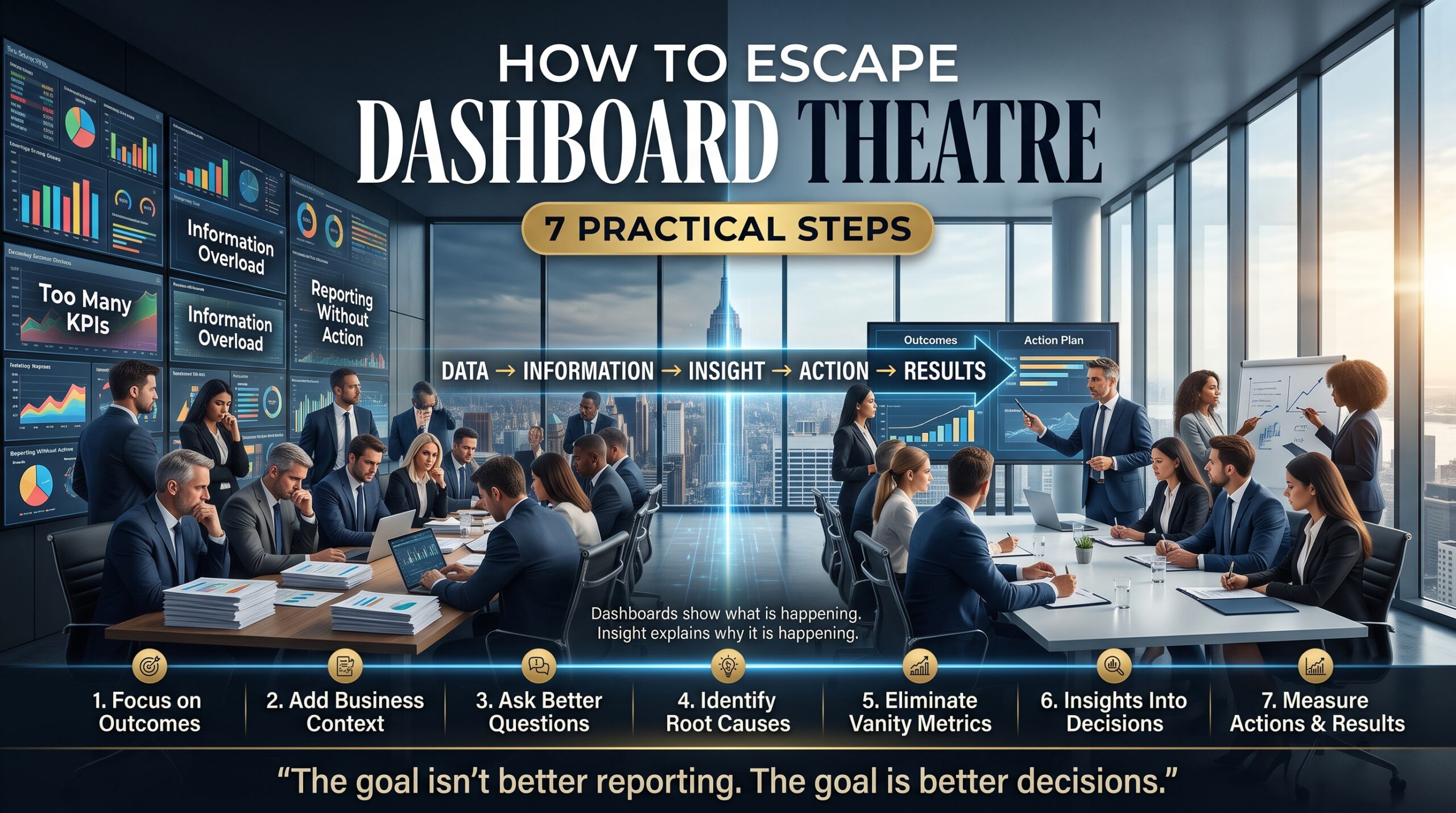
- Start with the decision, not the data. Ask what choice the report should help someone make, and who makes it. If you cannot answer, do not build the page yet.
- Give each page one question. Limit visuals to the few that answer that question. Remove anything that exists only to fill space.
- Add context to every number. Show targets, trends over time and comparisons so a figure can be judged at a glance.
- Make averages answer to the detail. Provide drill-through pages and tooltips so people can move from the headline to the cause in seconds.
- Write the “so what”. Add a short plain-English takeaway beside the chart. A visual without an interpretation leaves the work to a busy reader.
- Name an owner and an action. Every metric needs a person responsible for it and a clear response when it moves outside its range.
- Measure usage and outcomes. Check who opens each report, retire what nobody uses, and ask users what they did differently because of it.
Power BI Features That Support Real Understanding
Power BI includes several features that help reports inform rather than perform. Used well, they push a report toward investigation instead of display.
- Drill-through and tooltip pages let readers move from a summary to the detail without cluttering the main page.
- Decomposition tree and key influencers visuals help explain why a number moved, not just that it moved.
- Smart narrative adds automatically generated text summaries that you can edit into a clear takeaway.
- Conditional formatting highlights exceptions so attention goes to what needs action.
- Usage metrics show which reports people actually open, so you can retire the rest.
- Endorsed and certified semantic models give users confidence that the numbers come from a trusted source.
The official Power BI documentation covers each feature in detail. For design thinking beyond the tool, Perceptual Edge shares Stephen Few’s writing on dashboard design, Storytelling with Data focuses on communicating clearly with charts, and Edward Tufte’s site explores the principles of displaying evidence. We also cover this theme in Why Australian Businesses Pay More for People Who Explain Data.
How Power BI Training Helps You Beat Dashboard Theatre
Knowing the features is useful. Knowing when to use them, and when to leave a visual out, is what separates a builder from an analyst. Good training teaches both. At Power BI Course, the pathway looks like this:
- Power BI Beginner Course: connect and transform data with Power Query, build a first interactive dashboard and share it confidently.
- Power BI Intermediate Course: write DAX calculations, build drill-through report pages and apply row-level security and governance.
- Power BI Advanced Course: tackle complex DAX, optimise data models and integrate Python and R visuals.
- PL-300 Microsoft Power BI Data Analyst: prepare for the Microsoft data analyst certification. You can read the exam outline on Microsoft Learn.
- Introduction to Microsoft Power Platform (PL-900): see how Power BI fits with the wider Microsoft Power Platform.
- DP-600T00 Microsoft Fabric Analytics Engineer: build analytics solutions on Microsoft Fabric.
Unsure where to start? Browse every Power BI course, read more about us, or check the FAQs.
Power BI Training Across Australia
Dashboard theatre is not limited to one city. Power BI Course offers training in Melbourne and Sydney in person, in Brisbane at a dedicated training room, and live online or onsite for Perth, Canberra and Adelaide. Learners in Hobart and across New Zealand can join live online.
Melbourne and Sydney teams working in finance, government, retail and health often manage dozens of reports at once, so a fresh look at report purpose pays off quickly. See all options on our locations page.
Training a whole team together is often the fastest way to change how reports are designed and discussed. You can enquire about corporate training or call 1300 649 299.
Dashboard Theatre FAQs
What is dashboard theatre?
Dashboard theatre is the habit of building and presenting dashboards that look impressive but do not change decisions. People feel informed because the information is on screen, yet they do not actually understand what is driving the numbers.
How do I know if my reports suffer from it?
Ask which decision each report supports and who acted on it last. If nobody can answer, if pages are crowded, or if people keep private spreadsheets, your reports are probably performing rather than informing.
Is a simple dashboard better than a detailed one?
Usually simpler is better for the main page, as long as detail is one click away. Use drill-through and tooltip pages so readers can investigate without a cluttered front page.
Can Power BI training fix dashboard theatre?
Training helps when it covers interpretation and design as well as technical skills. Courses that use real business scenarios teach people to ask what a report is for before they build it. Explore our Power BI courses to compare levels.
Which course should I start with?
If you are new to the tool, start with the Beginner Course. If you already build reports and want to add calculations and governance, the Intermediate Course is the natural next step.
Keep Reading
- The Certainty Premium: Why Businesses Pay More for Confidence Than Information
- Why Businesses Pay More for People Who Influence Decisions Than People Who Build Dashboards
- Why Power BI Skills Are Becoming the New Excel Skills
- Why Most Power BI Learners Never Become Data Analysts
Conclusion: Replace the Performance With Understanding
Dashboard theatre is not a sign that your team is careless. It is a sign that reporting has drifted toward appearance and away from action. Start with the decision, simplify the page, add context, and name an owner, and the same data suddenly becomes useful.
If you would like help building that capability, explore our Power BI courses, read more on the blog, or contact the team to find the right course for you and your organisation.