


Dashboard ownership is the simple question of who is responsible for a Power BI report once it goes live: who keeps the data fresh, who answers when a number looks wrong, and who switches it off when it stops being useful. When nobody can answer that question, even a beautifully designed dashboard slowly turns into a liability.
Thank you for reading this post, don't forget to subscribe!Most organisations pour effort into building reports and almost none into looking after them. A dashboard launches with plenty of excitement, gets shared with half the company, and then the analyst who built it moves to another project. Six months later the scheduled refresh has been failing for weeks, two versions of the same report disagree, and a director is quoting a figure nobody can trace. This guide explains why Power BI reports fail when nobody owns them, how to spot the problem early, and the practical steps to fix it, whether your team sits in Melbourne, Perth or anywhere in between.
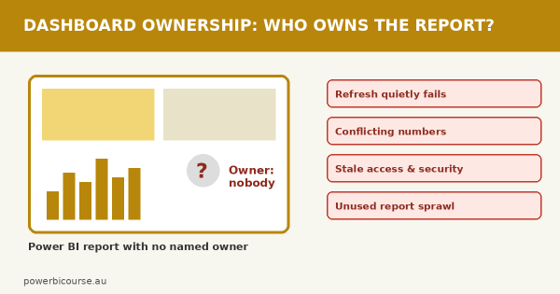
Without dashboard ownership, a polished Power BI report is only one broken refresh away from losing trust.
What Is Dashboard Ownership and Why Do Power BI Reports Fail Without It?
Think of a Power BI dashboard like a company vehicle. Someone built it, plenty of people use it, and it needs regular servicing. Dashboard ownership is the servicing plan. It means a named person, not a shared mailbox and not “the BI team”, who is accountable for the report’s accuracy, refresh, access and eventual retirement.
Without it, small cracks go unnoticed. A data source renames a column. A gateway credential expires. A DAX measure written by a former colleague no longer matches how the business now defines revenue. None of these is dramatic alone, but with no owner watching, they stack up until users quietly stop trusting the report. That loss of trust is the real failure, and it is far harder to repair than a broken refresh.
Power BI makes publishing so easy that reports multiply faster than responsibility. That gap between creation and care is the dashboard ownership problem.
Warning Signs of a Dashboard Ownership Problem
Not sure whether this is happening in your organisation? See how many of these feel familiar:
- Nobody can say who to contact when a number looks wrong.
- The “last refreshed” date is days or weeks old and no one has noticed.
- Several reports show different totals for what should be the same measure.
- The workspace is full of copies with names like “Sales Dashboard – Copy – NEW”.
- The person who built the report has left, yet it still drives decisions.
- Nobody knows who has access to the report, or why.
- Stakeholders export data to Excel because they no longer trust the visuals.
- Change requests sit in an inbox because no one has authority to approve them.
If you recognised three or more, it is time to treat dashboard ownership as a priority rather than a tidy-up for later.
What Happens When Nobody Is Responsible for a Power BI Report?
The damage rarely arrives all at once. It tends to unfold in a recognisable sequence.
Scheduled Refresh Quietly Breaks
Refresh failure notices normally go to whoever owns the semantic model (the item formerly called a dataset). If that person has moved on, the alert lands in an inbox nobody reads. Meanwhile the dashboard keeps showing old numbers with total confidence, which is arguably worse than an obvious error message.
Competing Versions of the Truth
When dashboard ownership is unclear, anyone can copy a report and tweak it. Soon there are three “Revenue” measures, each calculated a little differently, and meetings turn into debates about whose number is right instead of decisions about what to do next. Microsoft’s Power BI implementation planning guidance covers content ownership and governance in depth, and it is well worth a read before your report library grows any further.
Security and Privacy Gaps
Row-level security rules, workspace roles and sensitivity labels all need someone to keep them current. People change jobs, contractors finish up, and access lingers long after it should have been removed. For Australian organisations handling personal information, that is a risk worth taking seriously, and the Office of the Australian Information Commissioner is the right place to check your privacy obligations.
Report Sprawl and Confusion
Unused dashboards clutter workspaces and make it harder for new staff to find the “right” report. Nobody retires them because nobody owns them. Over time the library becomes a maze, and every new request starts with the same question: which version is the real one?
Trust Collapses and Spreadsheets Return
The last stage is the most expensive. Once users stop trusting a dashboard, they rebuild the numbers by hand in Excel, and the original investment in business intelligence is wasted. Restoring that trust takes far longer than building the report ever did.
Why the Dashboard Ownership Problem Happens
Nobody plans for it. It usually grows out of success:
- Self-service BI takes off, and enthusiastic staff publish reports quickly.
- The builder becomes the owner by default, even after changing roles.
- Projects end, but the reports they created live on.
- There is no handover process when someone leaves or moves teams.
- IT assumes the business owns the content, while the business assumes IT keeps it running.
- No time or budget is set aside for maintenance after launch.
Self-service is a good thing. But self-service without dashboard ownership is how organisations end up with hundreds of reports and no accountability.
A Quick Example of Dashboard Ownership Going Wrong
Here is a composite scenario based on situations commonly seen in Australian workplaces. A Perth logistics company relied on a fleet utilisation dashboard built by an external contractor. When the contract ended, there was no documentation and no named owner. A routine password change during an IT security update broke the gateway connection, and the scheduled refresh began failing without anyone noticing.
For a full week, operations managers planned driver rosters from outdated figures, and two depots booked the same trucks. The technical fix took twenty minutes: update the stored credentials. The cost was a week of rework and some unhappy customers. Afterwards the company did something simple that should have happened on day one: it named an owner for every report.
How to Fix Dashboard Ownership: 9 Practical Steps
- Take inventory. List every report and workspace in use, and note who built it, who uses it and how often.
- Name one accountable owner per report. A real person, with a backup, recorded in a simple register.
- Separate the roles. Distinguish the business owner, the report developer, the data steward and the workspace admin (see the table below).
- Send refresh alerts to a team. Make sure failure notifications reach more than one person, and check them weekly.
- Use endorsement. Mark trusted reports as promoted or certified so users know which version to rely on.
- Document inside the report. Add a short “About this report” page covering purpose, data sources, refresh schedule and owner contact.
- Organise workspaces. Use clear naming conventions and keep development and production content apart.
- Review usage regularly. Check usage metrics each quarter and retire reports nobody opens.
- Build a handover checklist. When someone leaves or changes role, transfer report ownership before their last day.
Here is a simple way to divide responsibility:
| Role | What they are responsible for |
| Business owner | Defines what the numbers should mean, approves changes and decides when the report is retired. |
| Report developer | Builds and updates visuals, measures and models, and documents how they work. |
| Data steward | Keeps the underlying data accurate, consistent and properly defined. |
| Workspace admin | Manages access, security settings, refresh health and endorsement. |
Microsoft’s Power BI documentation explains workspace roles, endorsement and refresh settings in detail, so you can match each of these responsibilities to a setting.
Train Your Team So Dashboard Ownership Sticks
Policies only work when people have the skills to follow them. Teams that understand data modelling, DAX, refresh settings and report design are far better placed to look after what they build. Power BI Course Australia offers instructor-led face-to-face training, live virtual classes and in-house team training, covering:
- Power BI Beginner Course: importing data, building visuals and publishing your first reports.
- Power BI Intermediate Course: data modelling and DAX, including measures and time intelligence.
- Power BI Advanced Course: sophisticated modelling, combining multiple data sources and custom visuals.
- PL-300 Microsoft Power BI Data Analyst: hands-on, certification-focused training. See Microsoft’s page for the Power BI Data Analyst Associate certification for exam details.
- DA-100 Analyzing Data with Microsoft Power BI: the earlier certification pathway, also listed on the course site.
Not sure which level fits each person? Use the enquiry form and the team will point you to the right course.
Power BI Courses Across Australia to Close Dashboard Ownership Gaps
Whether your analysts sit in one office or work across several states, there is a format to suit. Training is available in these cities, plus live virtual classes throughout Australia:
- Power BI training in Melbourne
- Power BI training in Sydney
- Power BI training in Brisbane
- Power BI training in Perth
- Power BI training in Adelaide
- Power BI training in Canberra
Prefer to bring the trainer to you? In-house sessions let a whole team learn on its own reports and agree on dashboard ownership rules at the same time.
Dashboard Ownership FAQs
What is dashboard ownership in Power BI?
It means a named person is accountable for a report’s accuracy, refresh, access and retirement. Ownership turns a published dashboard from a one-off project into a maintained business asset.
Who should own a Power BI dashboard, IT or the business?
Usually both, with different jobs. The business owns the meaning and use of the numbers, while IT or a BI team supports the platform, security and refresh. What matters is that each report has one clearly named accountable person.
How do I find out which Power BI reports nobody owns?
Start with a workspace inventory and the usage metrics. Reports with no recent views, creators who have left, or failed refreshes are the first candidates for an owner or for retirement.
Does dashboard ownership slow down self-service BI?
Not if it is kept light. A short register, clear roles and a handover checklist add very little effort, and they prevent the far larger cost of untrusted reports.
How long does it take to fix dashboard ownership?
You can make real progress in a week by naming an owner for your ten most-used reports. Building wider habits and skills takes longer, but it pays off every time a report needs attention.
Conclusion: Give Every Dashboard an Owner
Dashboard ownership costs very little to set up and a great deal to neglect. Start small this week: list your most important Power BI reports, name an owner for each, and make sure refresh alerts reach more than one person. Then build the skills that keep those reports healthy for the long run.
Ready to upskill your team? Visit Power BI Course Australia to enquire about Power BI Beginner, Intermediate, Advanced and PL-300 training in your city or online.