


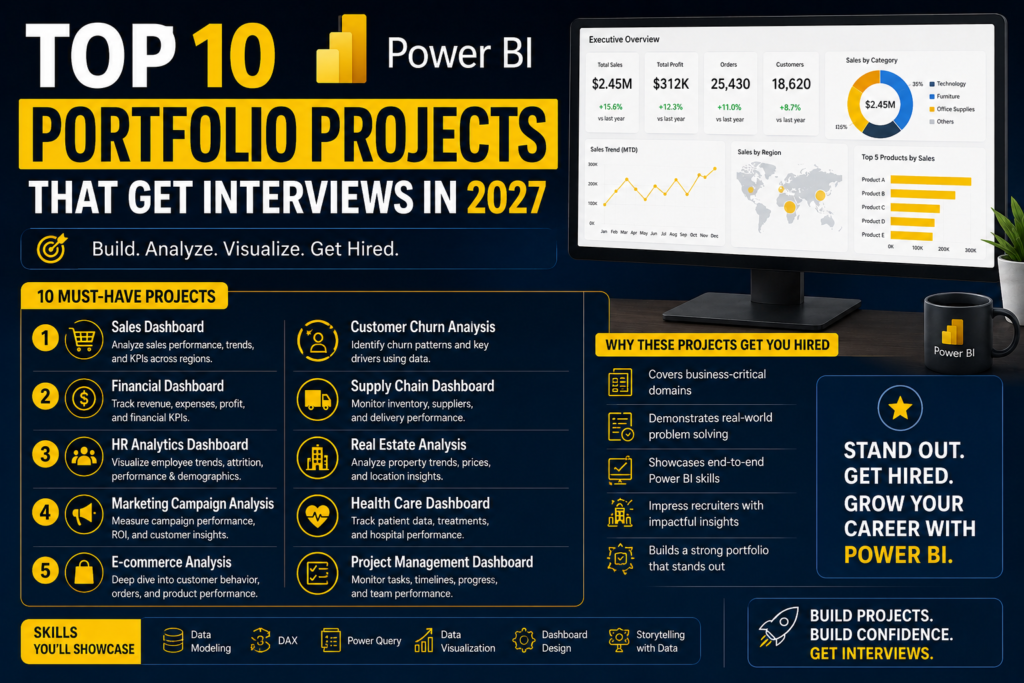
Power BI portfolio projects are what actually get you shortlisted for a data analyst or BI role in 2027 not another certificate badge on LinkedIn. Australian hiring managers move fast through applications, and a well-built Power BI portfolio project gives them something real to click into, question you about, and remember, long after your resume has blurred into the pile.
Thank you for reading this post, don't forget to subscribe!This guide covers 10 Power BI portfolio projects that consistently get candidates interviews, what makes each one strong, and exactly how to build, host and talk about them so they turn into job offers rather than sitting unopened in a Power BI Service workspace.
Why Power BI Portfolio Projects Matter in 2027
Certifications like PL-300 prove you understand Power BI’s theory. Power BI portfolio projects prove you can actually build something a business would use. Hiring managers across Melbourne, Sydney, Brisbane, Perth, Adelaide and Canberra consistently say the same thing: they want to see how a candidate handles a messy, real dataset the data modelling decisions, the DAX logic, the trade-offs not just whether visuals look polished.
A strong project also gives you material for behavioural interview questions. Instead of a vague claim about “strong attention to detail,” you can walk an interviewer through a specific modelling decision, a DAX measure you had to debug, or a visual you deliberately simplified for a non-technical audience exactly the kind of concrete, evidence-based answer interviewers are trained to look for.
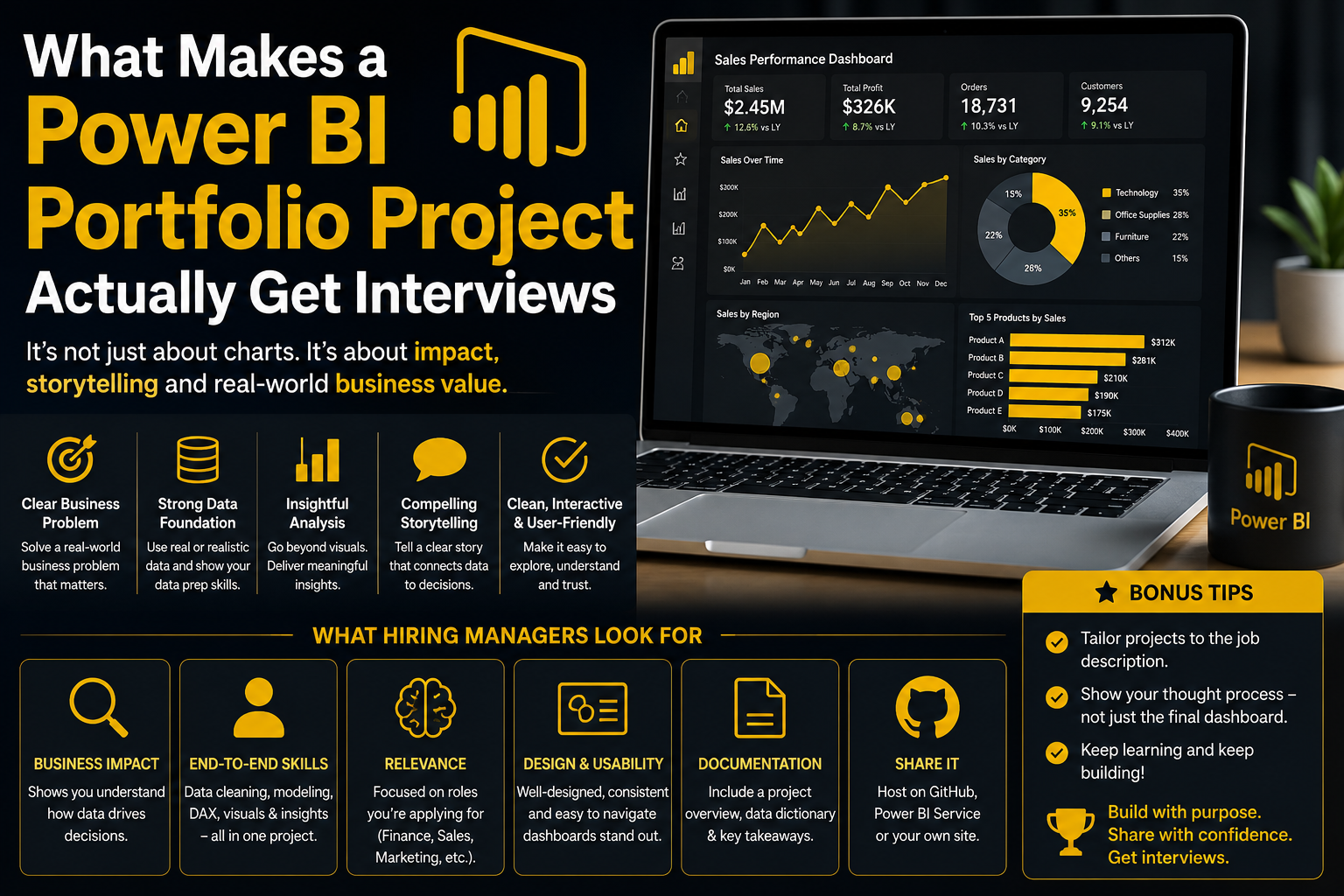
What Makes a Power BI Portfolio Project Actually Get Interviews
- It uses a real or realistic, messy dataset not a single perfectly clean sample table.
- It shows a proper star-schema data model, not one flat table dragged into visuals.
- It includes at least a few custom DAX measures, not just drag-and-drop aggregations.
- It’s hosted somewhere viewable Power BI Service, a published .pbix, or a short recorded walkthrough.
- It answers a specific business question with a clear recommendation, not just “here’s a dashboard.”
Top 10 Power BI Portfolio Projects That Get Interviews
You don’t need all 10. Three to five well-documented Power BI portfolio projects, each demonstrating a different skill data modelling, DAX, Power Query, row-level security will do far more for your 2027 job search than ten rushed ones.
1. Retail Sales Performance Dashboard
Skills shown: Power Query, star-schema modelling, DAX time-intelligence measures
Build a dashboard analysing sales by region, category and time period using a public retail dataset, with year-over-year and rolling-average DAX measures. This is the single most common Power BI portfolio project because retail and FMCG hiring managers can relate to it instantly, and it shows you understand time intelligence a common PL-300 exam and interview topic.
2. Budget vs Actual Financial Dashboard
Skills shown: DAX variance calculations, conditional formatting, bookmarks
Model budgeted vs actual spend across departments or cost centres, with variance highlighted using conditional formatting. Finance-style Power BI portfolio projects are consistently requested by hiring managers in banking, insurance and government roles across Australia.
3. HR Attrition & Workforce Analytics Dashboard
Skills shown: Data modelling, DAX, row-level security
Analyse a workforce dataset for attrition by department, tenure and role, and add row-level security so different managers only see their own team’s data. Demonstrating RLS is a strong differentiator, since many junior candidates skip it entirely.
4. Customer Churn / Subscription Analytics Report
Skills shown: Power Query transformations, DAX, cohort analysis
Use a telco or subscription-style dataset to identify which customer segments are most likely to churn, and present findings as clear, actionable recommendations rather than just a correlation table.
5. Supply Chain & Inventory Dashboard
Skills shown: Data modelling, DAX, drill-through pages
Model stock levels, lead times and order fulfilment for a logistics dataset, with drill-through pages from a summary view down to individual SKUs. Supply chain analytics is in strong demand across Perth and Brisbane’s resources and manufacturing sectors.
6. Public Sector / Open Data Story
Skills shown: Power Query, DAX, data storytelling
Australian government open data (health, housing, transport) is instantly credible to local employers. Pick a genuinely interesting question regional housing affordability, for example and build a short, focused data story rather than a sprawling dashboard.
7. Marketing Campaign Performance Report
Skills shown: DAX, calculated columns, what-if parameters
Pull together spend, reach and conversion data across campaigns, and use a what-if parameter to model different budget allocation scenarios. This shows commercial thinking that goes beyond basic reporting.
8. Executive KPI Summary Dashboard
Skills shown: Advanced DAX, bookmarks, mobile layout
Build a concise, single-page executive summary with KPI cards, trend sparklines and a mobile-optimised layout. This project demonstrates you can design for a senior, time-poor audience, not just build detailed analyst-facing reports.
9. Real Estate / Property Market Trend Report
Skills shown: Power Query, DAX, geographic visuals
Using property price data by suburb or city, build a report with map visuals tracking price trends over time. This resonates strongly with Australian interviewers, given how closely the local property market is followed.
10. Power BI with Python or R Integration
Skills shown: Advanced analytics visuals, statistical modelling
Add a Python or R visual to a report a trend line, cluster analysis or forecast to show you can extend Power BI beyond native DAX and visuals. This is an advanced project best suited to candidates targeting senior analyst or analytics engineer roles.
How to Present Your Power BI Portfolio Projects in Interviews
A Power BI portfolio project only works if you can talk through it clearly and confidently. For each one, prepare a two-minute walkthrough covering the business question, your data model, one interesting DAX or Power Query decision, and the final recommendation.
- Lead with the business question, not the visuals.
- Be ready to explain one modelling decision or DAX bug you had to fix this signals real hands-on experience.
- Share a live Power BI Service link where possible, plus a short PDF or recorded walkthrough as backup.
- Keep the report itself clean three to five focused pages beats fifteen cluttered ones.
Where to Find Realistic Data for Your Power BI Portfolio
Microsoft publishes official sample datasets built specifically for Power BI practice, and data.gov.au adds Australian-specific context that resonates strongly with local hiring managers — far more relevant here than generic overseas sample data.
Build the Skills Behind the Projects
The strongest Power BI portfolio projects come from analysts who understand data modelling, Power Query and DAX properly not from copying a YouTube tutorial without knowing why each step matters.
If you’re starting out, our Power BI Beginner Course covers Power Query and your first dashboard from scratch. Our Power BI Intermediate Course adds DAX and row-level security exactly what powers projects 1, 3 and 4 above and our Power BI Advanced Course covers the time-intelligence DAX, enterprise data modelling and Python/R visual integration behind projects 8 and 10.
If certification is the goal, PL-300 Microsoft Power BI Data Analyst maps directly to the official exam, PL-900 Introduction to Microsoft Power Platform is a strong entry point, and DP-600 Microsoft Fabric Analytics Engineer is the natural next step once you’re ready for enterprise-scale data platforms.
Courses run in person in Melbourne, Sydney and Brisbane, with live online delivery for learners in Perth, Adelaide and Canberra.
Related Reading
For the skill decisions behind these projects, see our guide to Power Query vs DAX: What Should You Learn First?, our walkthrough on How to Build Your First Power BI Dashboard, our roundup of Power BI Interview Questions & Answers for Australian Job Seekers, and Power BI Career Opportunities in Australia: Roles, Skills & Salaries for the bigger career picture.
Frequently Asked Questions
How many Power BI portfolio projects do I need to get interviews?
Three to five well-documented projects, each showing a different skill (data modelling, DAX, Power Query, RLS), is generally far more effective than a long list of shallow dashboards.
Should I use real company data or public datasets?
Public and open government datasets, like data.gov.au, or Microsoft’s official Power BI sample files, are the safest option. Never use confidential data from a current or former employer without written permission.
Where should I host my Power BI portfolio projects?
Publish to Power BI Service where possible so interviewers can interact with the report live, and keep a short recorded walkthrough or PDF export as a backup for anyone without a Power BI licence.
Conclusion
Power BI portfolio projects are the fastest way to turn a 2027 job application into an interview, because they give hiring managers real, checkable evidence instead of a list of claimed skills. Pick two or three project types from this list, build them properly with a clear data model and documented DAX decisions, and you’ll have something far more persuasive than another line on a resume.
Want structured support while you build them? Explore our Power BI courses across Australia or get in touch to enrol.